
How To Read Your Meter


Joshua Basin Water District completed its meter replacement program in 2025. Throughout the district, we have upgraded to the Sensus iPerl meter, which an extremely accurate, consistent, and resilient device.
Digital Water Meter Dials – 3/4-Inch & 1-Inch Meters
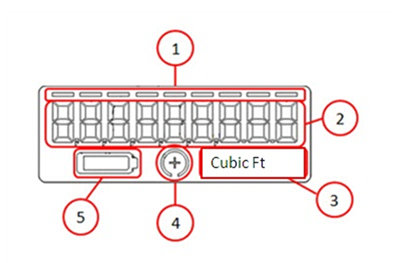
- There are 9 digits / bars on the Sensus iPerl meter at the top of the digital display. Only the 1st 4 numbers at the far left will be programmed in 100 cubic feet and read.
- You can also monitor the 9th number to the far right to check for leaks. Example: If the number rotates from 0 to 1, that’s equivalent to 1/1,000th of one cubic foot of water (which is approximately 1 ounce).
- Joshua Basin Water District uses 100 cubic feet as its units of measure.
- To check for leaks, use the Flow Direction / Empty Pipe Indicator. If there is a plus sign in the middle of this circle, water is passing through the meter.
- Battery life indicator.
100 cubic feet = 1 unit or 748 gallons
1 cubic foot = 7.48 gallons